All updates
New
Accept gifts from Donor-Advised Funds
Donors can now give straight from their Donor-Advised Fund in your donation form, powered by DAFpay by Chariot.
Rohit Kaushik, Head of Engineering
Donor-Advised Funds (DAFs) hold billions of dollars that donors have already set aside for charity. With DAFpay, a donor can recommend a grant from their fund right in your donation form, without leaving to log in to their fund's website or mail you a check. We take no platform fee on DAF gifts.
How it works
- A DAFpay button in your form. On campaigns where you turn it on, donors see "or give from your Donor-Advised Fund" on the amount step, before they're asked for an email.
- Details filled in for the donor. Their name and email come from their DAF account, so there's less to type.
- Whole-dollar grants. DAFs only grant whole dollars, so the form rounds the amount up and tells the donor. No processing fee or optional tip is added. The fund grants exactly the amount shown.
- One-time gifts only. A recurring gift would be scheduled inside the donor's fund, where you can't see or stop it. When you turn on DAFpay for a campaign, that campaign switches to one-time giving.
- An acknowledgement instead of a tax receipt. The donor got their tax deduction when they put money into the fund, so a DAF grant isn't deductible again. DAF donors get a grant acknowledgement email instead of a tax receipt.
- Track each grant in Finance. DAF gifts show up as DAFpay (Chariot) with their current status, for example waiting on the fund's approval, or submitted. Once the fund submits the grant, the money usually arrives by check or ACH within 2–4 weeks.
Before you start: set up a Chariot account
DAFpay is run by our partner Chariot, and you need a Chariot account to use it.
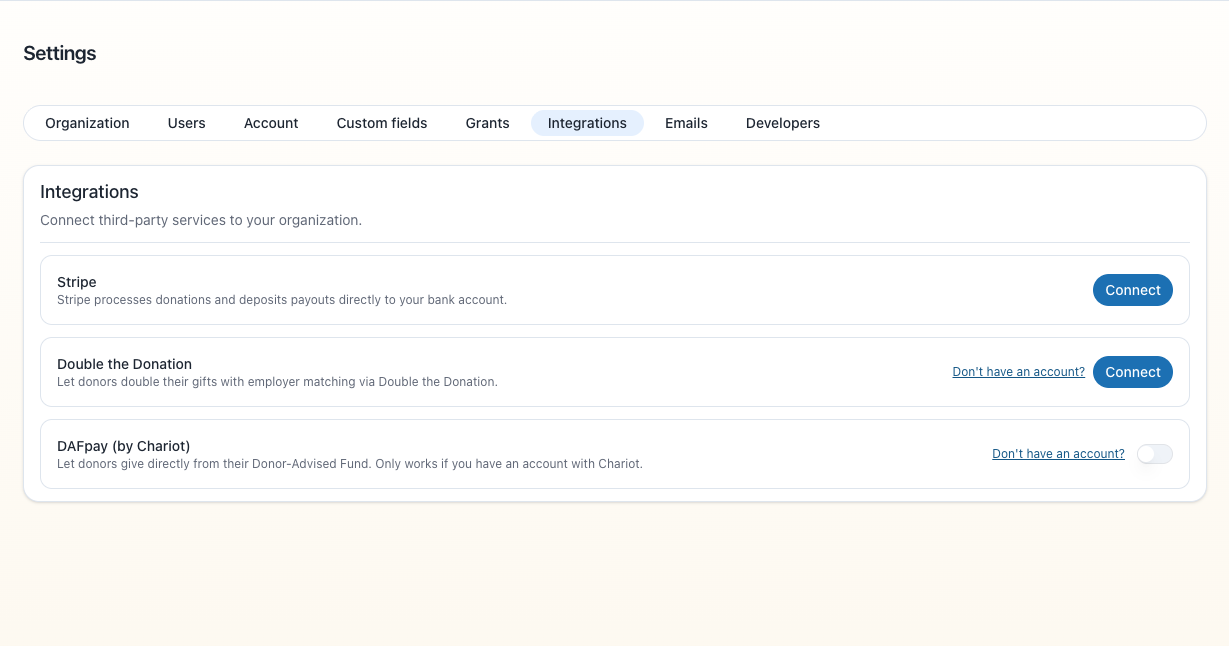
- Go to dashboard.givechariot.com/signup. There's also a Don't have an account? link on the DAFpay card in Settings → Integrations.
- Sign up with the same EIN your organization uses in Sponsor a Purpose.
- Chariot finds your organization by its EIN. If you get an error saying Chariot has no verified organization for your EIN, email support@givechariot.com and ask them to add it.
How to turn it on
You need to be an admin to change these settings.
- Add your EIN. Go to Settings → Organization and enter your organization's EIN, if it isn't there already.
- Connect DAFpay. Go to Settings → Integrations and turn on DAFpay (by Chariot).
- Turn it on for each campaign. Open a campaign, go to its Settings tab, and under Integrations turn on Show DAFpay in this campaign. Do this for every campaign where you want the button. If the campaign offered monthly or other recurring gifts, it switches to one-time only.
You can turn DAFpay off at any time, for one campaign or for your whole organization.
